Support/Signing In & Your Account
I signed up with Apple ID and it logs in to a different account
Apple's Hide My Email gives apps a masked address that looks like 3wp72xbn4kj9m@privaterelay.appleid.com instead of your real one. Your account is attached to that masked address, so signing in with your personal address won't find it.
To fix it:
- Keep using Apple sign-in. Select Continue with Apple and you'll reach your account normally.
- If you recently turned Hide My Email on, turn it off and sign in again with your actual address.
- If you'd like both to work, contact us and we can link your real email address to the same account.
- Spicychat will appear as Kinde in your Hide My Email settings. Kinde is our login provider who sends the codes.
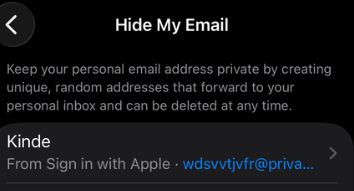
Include the full masked address if you have it — you'll find it in your Apple ID settings under Sign in with Apple. Without it we may not be able to locate your account.
Was this article helpful?
That’s Great!
Thank you for your feedback
Sorry! We couldn't be helpful
Thank you for your feedback
Feedback sent
We appreciate your effort and will try to fix the article