Account deletion is permanent and cannot be undone. Please read article 1.7 before you start.
What’s removed: your chats, saved conversations, characters, personas, settings and memories. None of it can be recovered.
To delete your account:
- Sign in
- Open your profile settings — tap You at the bottom right on the app, or your profile icon at the top right on the website
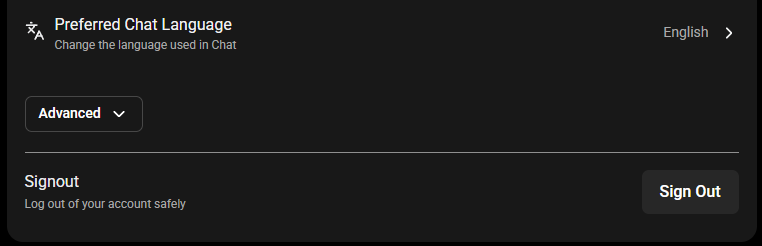
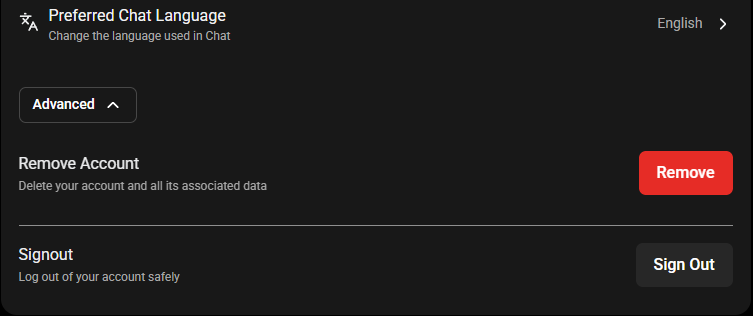
- Scroll down and select Advanced to expand the section
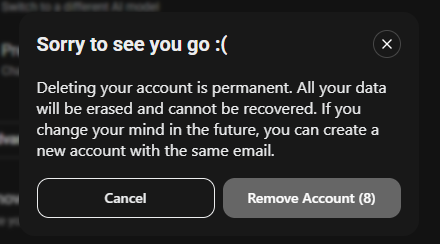
- Select Remove Account
- A 10-second countdown runs, then the account is removed
- You’ll be returned to the guest screen and prompted to create a new account — this confirms it worked
About your subscription
Recurring subscriptions bought directly on the SpicyChat website are cancelled automatically when you delete your account. You don’t need to do anything.
Subscriptions bought anywhere else are not. If you subscribed through Google Play or SubscribeStar, that subscription is managed by them and will keep billing you after your account is gone. Cancel it there first — see article 3.5.
You can sign up again later with the same email address, but it’ll be a completely fresh account with none of your previous content.
One caution: repeatedly creating and deleting accounts on the same email address can trip our anti-abuse systems and result in that address being blocked.
Was this article helpful?
That’s Great!
Thank you for your feedback
Sorry! We couldn't be helpful
Thank you for your feedback
Feedback sent
We appreciate your effort and will try to fix the article