The most common question we get about the AI, and it isn't a bug.
The context window is how much text the AI can see at one time. Think of it as a desk with limited space. On that desk sits the character definition, your recent messages, its recent replies, and your generation instructions — all at once.
When the desk fills up, the oldest messages fall off to make room for new ones. Once something is off the desk, the AI can't use it.
Context window by tier:
| Tier | Context window |
|---|---|
| Free | 4,096 tokens |
| Get A Taste | 4,096 tokens |
| True Supporter | 8,192 tokens |
| I'm All In | 16,384 tokens |
A token is roughly a word, number, or symbol.
The whole window is shared, not reserved for your messages. If a character's definition uses 1,000 tokens and messages average 150 tokens each, a free-tier chat has room for roughly 20 recent messages. On I'm All In, with short messages, it can be closer to 100.
This is why long roleplays drift. After a few hundred messages, the early scene has fallen out of context entirely.
What actually helps
Use the Memory Manager and pin what matters. This is the real fix:
- Open the three dots at the top right of the chat
- Check whether it says Enable Memory — if so, select it. If it says Disable Memory, it's already on.
- Open Memory Manager
- Save the details you want kept, and pin the important ones
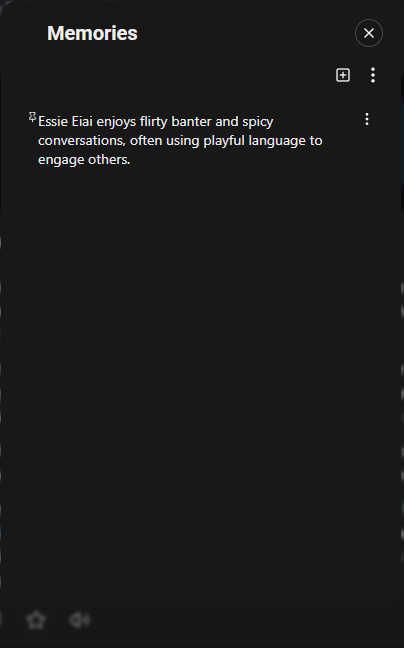
Pinned memories stay available even when the original messages have dropped out of context.
Try not to pin too many memories. This may prevent the Memory Manager from recalling other memories. Pin what’s important to the current story,
Memory Manager is available from Get A Taste upwards. Semantic Memory 2.0, which generates memories automatically as you chat, is on True Supporter and above.
Other things that help:
- Keep character definitions tight. Around 800–1,100 tokens is a good target. Every token in the definition is a token unavailable for conversation.
- Move background detail into a Lorebook instead of the definition — see article 6.9.
- Repeat or summarise key facts occasionally in your own messages.
- Delete old messages you don't need, to free up space.
- Keep your own messages reasonably concise.
- Upgrade for a bigger window, if you regularly run long chats.
There's no way to reset the context of an active chat without starting a new one. The closest thing is cloning the conversation from a point where it was working well — see article 4.4.
More detail: Tokens & Context
Was this article helpful?
That’s Great!
Thank you for your feedback
Sorry! We couldn't be helpful
Thank you for your feedback
Feedback sent
We appreciate your effort and will try to fix the article